How to Write a Virus Scanner
- Target Audience
- Main Content
- What is a Computer Virus
- Development of Antivirus Technology
- Analyzing Computer Viruses
- Writing a Simple Virus Scanner
- Goals
- Feature-Based
- Concept
- Machine Learning
- Obtaining Virus Samples
- Getting Started with Development
- Getting File Attributes with pedump
- Converting File Attributes to Vectors
- Training the Model
- Testing the Model
- Remaining Issues
- Source Code
- Origin of the Above Ideas
- Related Books
- Material Download
- Personal Summary
- December 7, 2014, Open Source China Jinan City Circle Event Technical Talk
- First public technical presentation
- Organized the content from this presentation into a simple tutorial
Target Audience
- Beginners interested in virus analysis
Main Content
- What is a computer virus
- Development of antivirus technology
- Analyzing computer viruses
- Writing a simple virus scanner
What is a Computer Virus
Definition of Computer Virus
- In 1949, von Neumann first gave the definition of a virus in his paper “Theory of self-reproducing automata”:
"An automaton capable of actually reproducing itself." - Wikipedia: A computer virus is a computer program that can self-replicate or execute without the user’s knowledge or approval, created under human or non-human circumstances. Reference
The First Computer Virus
-
In the 1960s, three people at Bell Labs implemented two programs on core memory. These two programs tried to replicate themselves and kill each other, a game called “Core War.”
-
The generally recognized first virus was born in 1971, a program called Creeper. Reference.
-
Reaper was a virus-like program used to remove Creeper.
Main Characteristics of Viruses
- Propagation
- Stealth
- Infectivity
- Latency
- Triggerability
- Manifestation
- Destructiveness
- Variability
Classification of Viruses
- Trojans, botnets (zombies or compromised machines, DDoS)
- Malware (worms, spyware, adware, prankware)
- Script viruses (macro viruses)
- File viruses (infect files, reside in executables, etc.)
Additionally, you can refer to the virus signature classification of the open-source antivirus software ClamAntiVirus, as shown in the figure:
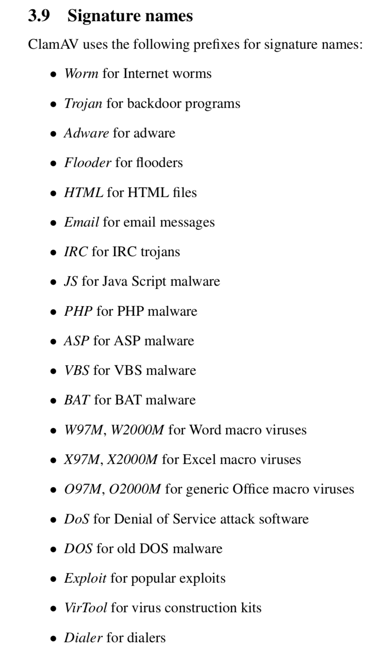
Of course, the above classification is not strict, and there is no single classification standard. I believe they can all be collectively called “malware”.
Damage Caused by Viruses
- Blaster Worm
- August 2003
- DDoS attack on windowsupdate.com
- Exploited system RPC vulnerability, auto-propagated
- Caused system reboots and crashes
- Many variants emerged later
The virus author was interesting—he wrote his own name "Parson" into the virus, which led to his capture.
- Prank Viruses
- Ghost Virus
- 2000
- When it broke out in Taiwan, it caused someone to be hospitalized and die from excessive fright
- Flame, Stuxnet, Duqu
- National security level
- Flame targeted Iranian oil sector business intelligence, traceable to 2007, discovered by Kaspersky in 2012. The program was very large.
- Stuxnet targeted Iranian nuclear facilities
- Duqu targeted Iranian industrial control data
- It’s said that an explosion at an Iranian rocket launch site was caused by a virus, though officials didn’t acknowledge it.
- Reference
Development of Antivirus Technology
Components of Antivirus Software
- Scanner
- Virus database
- Virtual machine (mainly for unpacking)
First-Generation File-Based Scanning Technology
- String scanning technology
- Wildcard scanning technology
Second-Generation File-Based Scanning Technology
- Intelligent scanning
- Approximate exact matching
- Multiple feature sets
- Checksums, block checksums, cryptographic checksums, etc.
- Skeleton scanning
- Exact identification
ClamAV Hash-based & Body-based
Memory-Based
- Memory signatures
- To handle packed programs
Behavior-Based
- Behavioral signatures
- For example: “A program copies itself to the system32 directory, then auto-starts, and finally deletes itself”—this behavior is suspicious.
- Active defense
- MicroPoint
- 360 Security Guard
Cloud Scanning
- Leverage server capabilities
- Large numbers of clients report suspicious files
Multi-Engine
- 360’s QVM, cloud engine, Avira, BitDefender
This is just a business combination, not a substantial change.
Artificial Intelligence
- Machine learning, neural networks, etc.
- 360QVM (Qihoo Support Vector Machine)
- Massive whitelists and virus samples
- Patent Link
Analyzing Computer Viruses
PE Files
- Portable Executable
- PE format was modified from the Common Object File Format (COFF) used in Unix
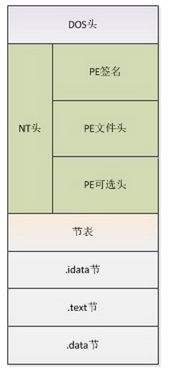
- Windows PE
- Linux ELF
- MacOS Mach-O
Basic Concepts
- IMAGE_DOS_HEADER
- MZ
- Mark Zbikowski, the original architect of MS-DOS
- Import Address Table (IAT)
- Export table
- Program entry point
- IMAGE_NT_HEADERS
- Sections
- IMAGE_SECTION_HEADERS
- …
Reference winnt.h
Packing
- Executable program resource compression
- Originally intended to protect files
- Special algorithms
- Unpacked in memory
- Example: UPX packer
Online Automated Analysis Tools
Static Analysis
IDA Pro PEView PEiD Sysinternals - string, autorun … Dependency Walker …
Dynamic Analysis
OllyDbg Windbg Wireshark …
Other Resources
Writing a Simple Virus Scanner
Goals
- Simple
- Scanning
- File-based
Feature-Based
- File Size
- Import Address Table (IAT)
- Section
- Resource (Version, Company)
- Packer
Concept
If we compare the relationship between “PE files and the operating system” to the relationship between “people and the world”:
- Analogy of Import Functions
- Import functions containing CreateFile can be seen as a person holding a pen—no harm to the world.
- Import function CreateService is like a person holding a small knife—some harm to the world, but not much.
- Import functions SetWindowsHook or CreateRemoteThread are like a person holding a gun—significant harm to the world.
- Analogy of Sections
- .text .rdata .data .rsrc .reloc are like a normally dressed good person.

- .upx .upx1 are like a bad person.

Machine Learning
- SVM - Support Vector Machine
- Supervised learning algorithm
- libsvm
- svm-toy.exe is simple and practical
Obtaining Virus Samples
Kafan or 52pojie also provide many samples.
Getting Started with Development
- Development language: Ruby
- Based on three libraries: rb-libsvm, pedump, sqlite3 Can be installed as follows:
  > gem install rb-libsvm
  > gem install pedump
  > gem install sqlite3
Getting File Attributes with pedump
- imports : string list
- sections : string list
- packer : string
- version : string
- company : string
Converting File Attributes to Vectors
-
Convert packer to vector 1 if packer exists, 0 otherwise
-
Same for version and company.
-
Convert import functions (imports) and sections to vectors
> You can do it like this:
> First, get the set of import functions from all files in system32 of a clean, virus-free system, set(A)
> Then get the set of import functions from a bunch of viruses (e.g., viruses obtained from virussign), set(B)
> set(C) = set(A) & set(B)
> set(D) = set(A) - set(B)
> set(E) = set(B) - set(A)
> Then assign different weights to set(C), set(D), set(E).
- Finally, combine all attributes in order to form a vector for a PE file
- You can get the database storing imports and sections with the following commands:
ruby rvsfetchiat.rb --health C:/Windows/System32
ruby rvsfetchiat.rb --virus E:/train_virus/files
ruby rvsfetchiat.rb --merge
- Get attributes of a file with the following command:
ruby rvsfetchiat.rb --file C:/Windows/System32/notepad.exe
Training the Model
Specify the folders containing the healthy files and virus files to train.
ruby rvsscan.rb --train /Users/everettjf/Virus/train/train_health /Users/everettjf/Virus/train/train_virus
Testing the Model
ruby rvsscan.rb --scan /Users/everettjf/Virus/train/train_virus
ruby rvsscan.rb --scan /Users/everettjf/Virus/train/train_health
ruby rvsscan.rb --scan /Users/everettjf/Virus/train/test_virus
ruby rvsscan.rb --scan /Users/everettjf/Virus/train/test_health
Remaining Issues
- Train on large numbers of samples
- Adjust parameters to reduce false positive rate
- Add more critical features, such as whether OEP is modified
- Self-learning
Source Code
Origin of the Above Ideas
QVM -> xiao70 -> me(everettjf)
Related Books
- “Encryption and Decryption”
- “The Art of Computer Virus Research and Defense”
- “Practical Malware Analysis”
-
“Hacker Anti-Kill Attack and Defense”
- “Programming Collective Intelligence”
- “Pattern Classification”
Material Download
Personal Summary
This presentation had the following issues:
- Insufficient time estimation. Due to uncertainty about the amount of content and lack of experience with presentation timing, I estimated 30 minutes, but it ended up taking over an hour.
- Insufficient interaction. There were almost no interactive segments, and I didn’t interact with the audience.
- Insufficient focus on key content. Too much background knowledge was covered upfront, taking up too much time. The final “machine learning implementation” section didn’t have enough time for explanation.
Overall, I believe this presentation deepened everyone’s understanding of viruses. I hope to have more opportunities to share in the future and contribute to building a good programmer community in Jinan.