iOS Time Retrieval Methods
Organize some methods related to getting time
Code Snippets
NSDate
// NSDate
NSDate *date = [NSDate date];
NSLog(@"date = %@",date);

// UTC
// Time since 00:00:00 UTC on 1 January 2001
NSTimeInterval interval2001 = [date timeIntervalSinceReferenceDate];
NSLog(@"interval2001 = %@",@(interval2001));

// UTC
// Time since 00:00:00 UTC on 1 January 1970
NSTimeInterval timestamp = [date timeIntervalSince1970];
NSLog(@"timestamp = %@",@(timestamp));
CFAbsoluteTimeGetCurrent
// GMT
// Time since Jan 1 2001 00:00:00 GMT
CFAbsoluteTime cftime = CFAbsoluteTimeGetCurrent();
NSLog(@"cftime = %@",@(cftime));
CACurrentMediaTime
// Absolute
// Stops when system sleeps
// Time since boot
CFTimeInterval catime = CACurrentMediaTime();
NSLog(@"catime = %@",@(catime));
NSProcessInfo
// Absolute
// Stops when system sleeps
// NSProcessInfo
NSTimeInterval processSystemUptime = [NSProcessInfo processInfo].systemUptime;
NSLog(@"uptime from NSProcessInfo = %@",@(processSystemUptime));
mach_absolute_time
// Absolute
// On iOS mach_absolute_time stops while the device is sleeping.
// https://developer.apple.com/library/archive/qa/qa1398/_index.html
// https://stackoverflow.com/questions/1450737/what-is-mach-absolute-time-based-on-on-iphone
// uint64_t abstime = mach_absolute_time();
// Stops when system sleeps
double uptimeInMilliseconds = 0.0;
{
    const int64_t kOneMillion = 1000 * 1000;
    static mach_timebase_info_data_t s_timebase_info;

    static dispatch_once_t onceToken;
    dispatch_once(&onceToken, ^{
        (void) mach_timebase_info(&s_timebase_info);
    });

    // mach_absolute_time() returns billionth of seconds,
    // so divide by one million to get milliseconds
    uptimeInMilliseconds = (double)((mach_absolute_time() * s_timebase_info.numer * 1.0) / (kOneMillion * s_timebase_info.denom * 1.0));
}
double uptime = uptimeInMilliseconds / 1000.0;
NSLog(@"uptime = %@",@(uptime));
clock
// clock
// Only for calculating time difference
// Returns the approximate processor time used by the process since the beginning of an implementation-defined era related to the program's execution. To convert result value to seconds, divide it by CLOCKS_PER_SEC.
clock_t clockvalue = clock();
getrusage
// returns information describing the resources utilized by the current process, or all its terminated child processes.
struct rusage process_usage_info;
int getrures = getrusage(RUSAGE_SELF, &process_usage_info);
NSLog(@"user time used = %@",@(process_usage_info.ru_utime.tv_sec * 1000 + process_usage_info.ru_utime.tv_usec));
NSLog(@"system time used = %@",@(process_usage_info.ru_stime.tv_sec * 1000 + process_usage_info.ru_stime.tv_usec));
time
// time
time_t timeresult = time(NULL);
NSLog(@"timeresult (s)= %ju", timeresult);
gettimeofday
// gettimeofday
// microseconds since Jan. 1, 1970
{
    struct timeval tv;
    gettimeofday(&tv,NULL);
    double timems = (uint64_t)tv.tv_sec * 1000 + (uint64_t)tv.tv_usec / 1000;
    NSLog(@"timeofday time (ms) = %@",@(timems));
}
clock_gettime
// clock_gettime
// Returns monotonically growing number of ticks in microseconds since some
// unspecified starting point.
// https://chromium.googlesource.com/chromium/src/base/+/master/time/time_mac.cc
// iOS 10 supports clock_gettime(CLOCK_MONOTONIC, ...), which is
// around 15 times faster than sysctl() call. Use it if possible;
// otherwise, fall back to sysctl().
{
    double clockgettimevalue = 0.0;
    struct timespec tp;
    if (clock_gettime(CLOCK_MONOTONIC, &tp) == 0) {
        clockgettimevalue = (int64_t)tp.tv_sec * 1000000 + tp.tv_nsec / 1000;
        NSLog(@"clock_gettime value = %@",@(clockgettimevalue));
    }
}
sysctl
// a timestamp of when the system last booted, also changes when the system clock is changed,
{
    struct timeval boottime;
    int mib[2] = {CTL_KERN, KERN_BOOTTIME};
    size_t size = sizeof(boottime);
    int kr = sysctl(mib, sizeof(mib)/sizeof(int), &boottime, &size, nullptr, 0);
    NSLog(@"boottime sysctl = %@", @(boottime.tv_sec * 1000 + boottime.tv_usec));
}
Summary
For calculating time consumption, generally can use CACurrentMediaTime() , this way can avoid errors from system time fine-tuning (for example during App startup system will automatically fine-tune to align time, a few seconds more or less).
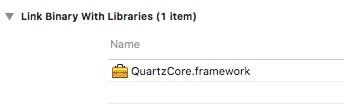
Finally, using CACurrentMediaTime in dynamic library, need to link QuartzCore.framework.
That’s it, simple and easy to use.
Welcome to follow subscription account “Client Technology Review”: