Print Block Parameter Signatures in Objective-C Methods Using lldb
iOS reverse engineering often encounters parameters of block type, this article introduces an lldb script, can quickly print block parameter types in Objective-C methods.
Header files from class-dump often contain method signatures like:
- (void)doSomethingWithCompletionHandler:(CDUnknownBlockType)arg1;
CDUnknownBlockType is block type parameter. When we want to call this method, need to know this parameter type.
Searched online, found a good article, article explains method of using lldb commands to find parameter types. Link:
http://www.swiftyper.com/2016/12/16/debuging-objective-c-blocks-in-lldb/
But each time need to type lldb commands one by one, very troublesome. So searched and found an lldb script,
https://github.com/ddeville/block-lldb-script
However old and unmaintained, doesn’t really work.
Then try to fix this script!
-> debugging .
-> debugging ..
-> debugging ...
-> ....
-> fixed, yeah :)
Installation
Install lldb script
cd ~
git clone git@github.com:everettjf/zlldb.git
Then in ~/.lldbinit file add line:
command script import ~/zlldb/main.py

Usage
For example we have block method below
@interface Hello : NSObject
@end
@implementation Hello
+ (void)say:(NSString*)text callback:(void(^)(NSString *text,int x, NSString *y, double z, BOOL m))callback {
}
@end
Call as below:
[Hello say:@"world" callback:^(NSString *text, int x, NSString *y, double z, BOOL m) {
    }];
Then we breakpoint at this call line:

If reverse engineering work, no code, can breakpoint at objc_msgSend line, as below:
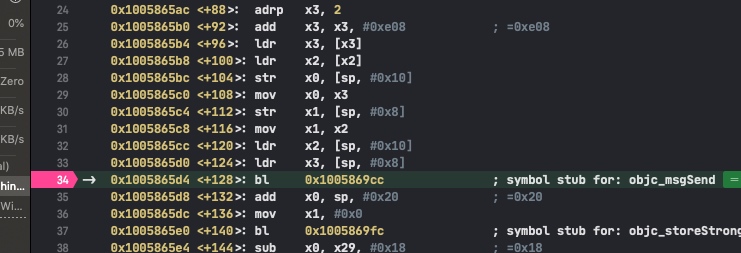
block is second parameter, then print $arg4
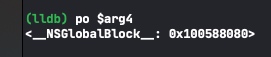
Then execute command zblock 0x100588080 (block’s address passed to zblock command), then block’s parameters come out.
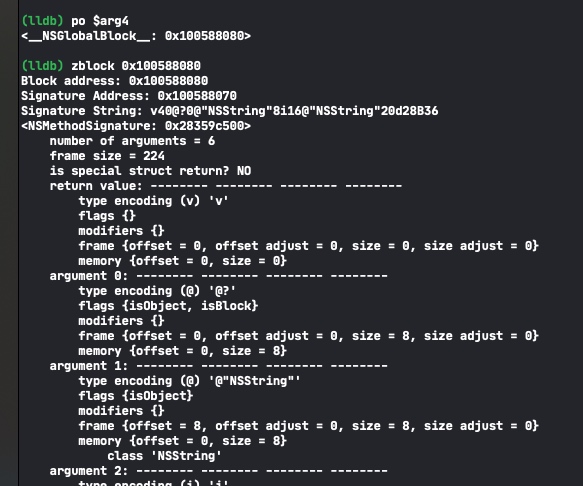
According to each line’s type encoding compare with Apple’s documentation can know what block’s parameters are.
https://developer.apple.com/library/archive/documentation/Cocoa/Conceptual/ObjCRuntimeGuide/Articles/ocrtTypeEncodings.html
Code
https://github.com/everettjf/zlldb
Since Xcode11’s built-in lldb script starts defaulting to Python3 version, facebook’s chisel still has some support issues (might be solved now). zlldb is putting several commands I commonly use here, supports Python3 (that is latest Xcode). Besides zblock, also has several simple commands, everyone can reference README.
References
- http://www.swiftyper.com/2016/12/16/debuging-objective-c-blocks-in-lldb/
- https://maniacdev.com/2013/11/tutorial-an-in-depth-guide-to-objective-c-block-debugging
- https://github.com/ddeville/block-lldb-script
- https://store.raywenderlich.com/products/advanced-apple-debugging-and-reverse-engineering
Enjoy :)
If everyone likes, follow subscription account to encourage: